
Intoduction
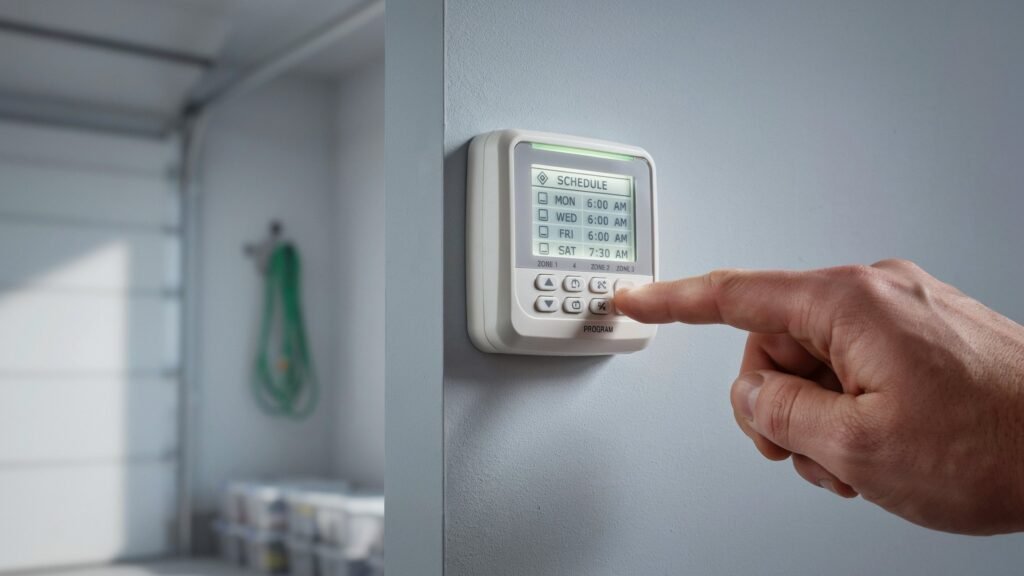
Why does my sprinkler system keep turning on by itself? It’s a fair question, and the answer is usually less alarming than it feels at 6 p.m. when the lawn is already soaked. Most of the time, the controller is doing exactly what it was told. It just isn’t doing what you meant.
This guide covers standard in-ground lawn sprinkler systems with a wall-mounted or smart controller and 24-volt valves. It does not cover fire sprinkler systems. Work through the causes from the most common to the least common, and you can usually find the culprit without calling anyone.
Table of Contents
Why Does My Sprinkler System Keep Turning On by Itself? The Short Answer
A sprinkler system that keeps turning on by itself is usually following a schedule you forgot about: extra start times, a second program, a reset clock, or a smart-app setting. Less often, a stuck valve or a wiring short opens a zone on its own. Check the schedule first, then the valves.
Here is the quick version:
- Look at every start time on every program, not just the one on the screen.
- Check the clock, including AM and PM.
- If it’s a smart controller, open the app and look at cycle, soak and make-up settings.
- Put the controller in its off position, or unplug it, and see if the water stops.
- If water keeps flowing from one zone, suspect the valve.
- If the zone turns on and off at odd moments with no schedule, check the wiring.
Match What You See to the Most Likely Cause
Before you open the controller, note what the sprinklers are actually doing. The pattern points you to the cause.
| What you notice | Most likely cause | Where to look |
|---|---|---|
| Every zone runs, then the whole cycle starts again | Extra start times or overlapping programs | Controller programs and start times |
| Watering at odd hours (midday, 3 a.m.) | A forgotten program, wrong AM/PM, or settings lost after a power cut | Controller clock and program list |
| Short bursts that repeat with pauses between | Cycle-and-soak feature (usually not a fault) | Smart controller settings |
| Runs when it’s raining | Rain sensor bypassed, miswired or failed | Sensor switch and sensor wiring |
| Runs when you’re not home and no one admits to it | App schedule, shared login, or manual start | Smart app and family accounts |
| One zone runs constantly or leaks through the heads | Stuck-open valve or solenoid problem | Valve box |
| One zone starts at random, with no schedule at all | Wiring short | Zone wires and splices |
The Two-Minute Test That Splits Schedule Problems From Hardware Problems
This test saves hours of guessing. It tells you whether the controller is sending the signal or whether a valve is stuck.
- Put the controller in its Off (or system-off) position. If it’s a smart controller, use the app’s pause or off setting.
- For extra certainty, unplug the controller from the outlet.
- Wait a minute and watch the zone that’s running.
If the water stops: the controller or its schedule is starting the watering. Go to the schedule, clock, smart-feature and manual-run sections below.
If the water keeps running: the controller isn’t the one opening that valve. The valve itself is stuck open, a bleed screw is loose, or a wire is sending power it shouldn’t. Skip ahead to the valve and wiring sections.
Shut It Off Safely While You Troubleshoot
If water is running and you need to stop it right now, you have two options:
- Close the zone valve by hand. Many valves have a flow control knob on top. Turning it fully clockwise usually stops the flow. Don’t force it.
- Close the main shutoff that feeds the whole system. It’s often near the water meter, in the basement, or by the backflow device.
Use the shutoff valve, not the controller, if the system won’t stop. Don’t touch exposed wiring while the controller is plugged in.
Extra Start Times Make the Whole System Run Again
This is the most common reason people think their sprinklers are running on their own.
On most controllers, a start time doesn’t start one zone. It starts the entire program, and the controller then runs every zone in order. Rain Bird’s own troubleshooting material explains that run days and start times apply to the whole program, not to individual zones, and that a program needs only one start time. If you add a second or third start time, the whole system runs again at each one.
Rain Bird also points out in its controller FAQ that the schedule can look like it restarts immediately. If your total run times are longer than the gap between two start times, the next cycle begins right as the first one finishes. It feels like the system is looping.
How to fix it:
- Open the program you use and scroll through every start time (1st, 2nd, 3rd and so on).
- Keep one start time. Delete the others. On many controllers you do this by moving the time past midnight until it shows as off, but the method varies, so check your manual.
- Add up your zone run times and make sure the program finishes before the next start time.
Hidden Programs Run Even When You Can’t See Them
Many controllers can store several programs, often labeled A, B and C. Every program that has a start time, run days and run times will run, whichever one is showing on the screen.
That means an old program from last summer can quietly water your lawn on its own schedule. A common story: someone created program B for a flower bed, forgot about it, and now wonders why the system starts at an odd time.
How to fix it:
- Press the program button to move between A, B and C, and read each one.
- Remove the start times or the run days from any program you aren’t using.
- If you can’t tell what’s going on, a full controller reset and a clean reprogram is often faster. Check your manual first, because a reset can erase everything.
Why Does My Sprinkler System Keep Turning On by Itself at Night or at Odd Hours?
If the watering happens at strange times, check the clock before anything else.
- AM and PM mixed up. A start time of 6:00 in the wrong half of the day puts watering in the evening instead of the morning.
- Power loss. After an outage or a surge, some controllers lose the time or fall back to a default schedule. Models with a backup battery usually hold their settings, but a dead battery can cause the same problem.
- Daylight saving time. On controllers that don’t adjust automatically, the schedule shifts by an hour twice a year.
How to fix it: Set the clock and date, confirm AM or PM, then re-check each program’s start time. If settings keep disappearing, replace the backup battery (if your model has one) and check that the controller’s power supply is solid.
Smart Controllers and Apps Can Start Watering You Didn’t Plan
A Wi-Fi or weather-based controller doesn’t always follow a fixed timetable. Some features can make it look like the system has a mind of its own:
- Cycle and soak. To reduce runoff, the controller splits one long run into several short ones with pauses between them. You see the sprinklers stop and start again, which looks like a glitch but is working as designed.
- Make-up watering. If a scheduled run was skipped for rain, wind or a pause, some controllers reschedule it for later.
- Weather adjustments. The EPA explains that weather-based irrigation controllers create or modify schedules based on weather, so run times and days can change without anyone touching the controller.
- Seasonal adjustment. A percentage setting can lengthen or shorten every run.
How to fix it: Open the app and look at the schedule view and the history or activity log, if your controller keeps one. Look for the feature names above (cycle, soak, make-up, smart or adaptive watering). Decide which you want, and turn off the rest. The exact names differ by brand, so use the manufacturer’s help pages for your model.
Someone Is Using the Manual Run Button or the App
It sounds obvious, but it happens. A family member may press the manual start button, run a test cycle, or use a shared app login. Contractors, house sitters or a previous owner may also still have access to a smart controller account.
How to fix it:
- Ask everyone in the household whether they’ve used the controller.
- In a smart app, check which users or devices have access and remove ones you don’t recognize.
- Change the account password if you suspect an old login.
- Look for a “manual” or “test” run left in progress on the controller screen.
A Stuck Valve or Leaking Solenoid Keeps Water Flowing
If the water kept running even with the controller off, the problem is in the valve box, not the schedule.
A zone valve opens when its solenoid receives 24 volts. It closes when the signal stops and water pressure pushes the rubber diaphragm back into place. Several things can stop it from closing:
- Debris caught under the diaphragm
- A worn or torn diaphragm
- A loose bleed screw or solenoid that lets water escape from the top of the valve
- A failing solenoid that doesn’t release fully
You may see one zone’s heads weeping, a zone that runs for a long time after the cycle ends, or a pool of water in the valve box.
What you can check:
- Close the main shutoff first. Then open the valve box and look for water spraying or seeping.
- Make sure the solenoid and bleed screw are snug (hand tight, not forced).
- If the valve still won’t close, it likely needs cleaning or a new diaphragm or solenoid.
For more on how valves work and how to repair them, see our guides on sprinkler system valve repair and valves for sprinkler systems.
A Wiring Short Can Open a Zone on Its Own
Sometimes a zone turns on at random with no schedule behind it. A damaged zone wire, or a splice that has corroded, can let current reach the valve when it shouldn’t. A wire nicked by a shovel and touching moisture is a classic example.
Signs include a zone that starts and stops irregularly, a blown controller fuse, or readings close to zero ohms on a zone circuit. Testing with a multimeter takes a few minutes, and our guide to sprinkler system electrical troubleshooting walks through the readings step by step.
If you don’t feel comfortable working with wiring, or you can’t find the damaged section, this is a good point to call a professional.
A Rain Sensor That Doesn’t Stop the Watering
Strictly, a bad rain sensor doesn’t turn the system on. It fails to stop a run that would otherwise be skipped. The result feels the same, because water falls from the sky and from your sprinklers at once.
Check that the sensor’s bypass switch isn’t left in the bypass position. Look for a disconnected, miswired or damaged sensor wire. Test it by pressing or wetting the sensor according to the manufacturer’s instructions, if it has a test feature.
How to Stop Unexpected Watering From Happening Again
Once you’ve fixed the cause, a few habits keep it from coming back:
- Check the controller once a month during the watering season. Look at the clock, programs and start times.
- Use a single program with a single start time unless you have a real reason for more.
- Delete unused programs instead of leaving them idle.
- Photograph your settings with your phone so you can restore them after a power cut.
- Review app users every few months on a smart controller.
- Replace the backup battery if your controller has one.
If the controller itself is old, glitchy or loses its settings, upgrading can be worth it. Our guide to the best programmable sprinkler timers compares models by number of zones, indoor or outdoor mounting, and how easy they are to program.
When to Call a Professional
Bring in a licensed irrigation technician or electrician if:
- You’ve ruled out the schedule, but a zone still runs with the controller off and you can’t fix the valve
- You see burn marks, melted plastic or water inside the controller
- The problem involves household-voltage wiring (the outlet or a hardwired controller)
- You suspect an underground wire fault you can’t locate
- Water is pooling or you’re seeing a spike on your water bill you can’t explain
Frequently Asked Questions
Why does my sprinkler system keep turning on by itself?
Most often, the controller is following a schedule you didn’t intend: extra start times, a forgotten second program, a wrong clock or a smart-app feature. If water keeps running with the controller off, the cause is more likely a stuck valve or a wiring fault.
Why does my sprinkler system run twice in a row?
Usually there are two start times in one program, or two programs set close together. Each start time runs all your zones. Delete the extra start time and check that your total run time fits before the next one.
Why do my sprinklers come on in the middle of the day?
Check for a hidden program, an incorrect AM/PM setting, or a controller that reset after a power outage. On a smart controller, look for make-up or cycle-and-soak runs.
Why does one sprinkler zone stay on all the time?
A stuck-open valve is the usual reason. Debris or a worn diaphragm can keep it from closing. A loose solenoid or bleed screw can do the same.
Can a power outage make my sprinklers turn on by themselves?
It can change the schedule. Some controllers lose their clock or revert to defaults after a power loss, which can shift when the system starts. A backup battery helps on models that support one.
Can someone else turn on my sprinklers with an app?
If the controller is a Wi-Fi model and others have access to your account or the shared login, yes. Remove unknown users and change the password.
Will it raise my water bill?
Unplanned cycles add water use, and that can add up fast. If you see an unexplained jump, track down the cause quickly.
What to Read Next
Now that you know why a sprinkler system keeps turning on by itself, you may want to understand the whole setup better. Our guide on how a sprinkler system works explains the controller, valves and heads, and our sprinkler system electrical troubleshooting guide covers power, zone wires and solenoids step by step.